

Cloud Security vs. On-Premises Security
A company running its own on-premises servers maintains more complete control over security. They are responsible for setting appropriate user access policies, installing firewalls and antivirus software, ensuring security patches are installed promptly, and guarding against cyberattacks. This degree of control can be something of a double-edged sword. For a business with appropriate IT support, on-premises solutions give companies confidence that their servers are locked down — they don’t need to trust another company with their private data. On the other hand, if mismanaged, on-prem servers can leave an organization vulnerable to security threats.
The security of the cloud vs. on-premises is a key consideration. Cloud security controls have historically been considered less robust than on-prem ones, but cloud computing is no longer a new technology. Nowadays, more and more businesses are trusting the cloud for their security needs.
Among many, cloud environments have a reputation for being less secure than on-premises environments. However, this isn’t a completely accurate judgement. While organizations are justified in their apprehension when considering a cloud migration, the cloud’s security is not inherently second-class. Rather, the challenge in securing a cloud environment is based in fundamental differences between on-premises and cloud environments.
In fact, moving your data to a reputable cloud hosting service such as Microsoft Azure or Microsoft 365 provides a level of security that can't be duplicated on site. That's because most organizations simply don't have the financial or staffing resources to provide the same security benefits as large cloud services providers can.
Microsoft 365, as a service, contains many administration portals, options, and configuration settings focused uniquely on Security. Each service is protected predominantly by Azure Active Directory for Authentication, with each application authorizing users to access either the app itself or content that resides within.
Out of the box, newer tenants (created on or after October 22nd, 2019) have the Security Defaults enabled that implement some necessary and best-practice capabilities. Tenants created before this date will not be enabled.
However, both old and new Microsoft 365 tenants require a higher level of security to be protected against advanced threats.
“Never trust, always verify”
A malicious act can be carried out in the company by internal or external staff. Also, a hacker does not need to be on company premises to perform a malicious act.
Today’s organizations need a new security model that more effectively adapts to the complexity of the modern environment.
The Zero Trust model assumes breach and verifies each request as though it originates from an open network.
Regardless of where the request originates or what resource it accesses, Zero Trust teaches us to "never trust, always verify".
Every access request is fully authenticated, authorized, and encrypted before granting access. Micro segmentation and least privileged access principles are applied to minimize lateral movement.
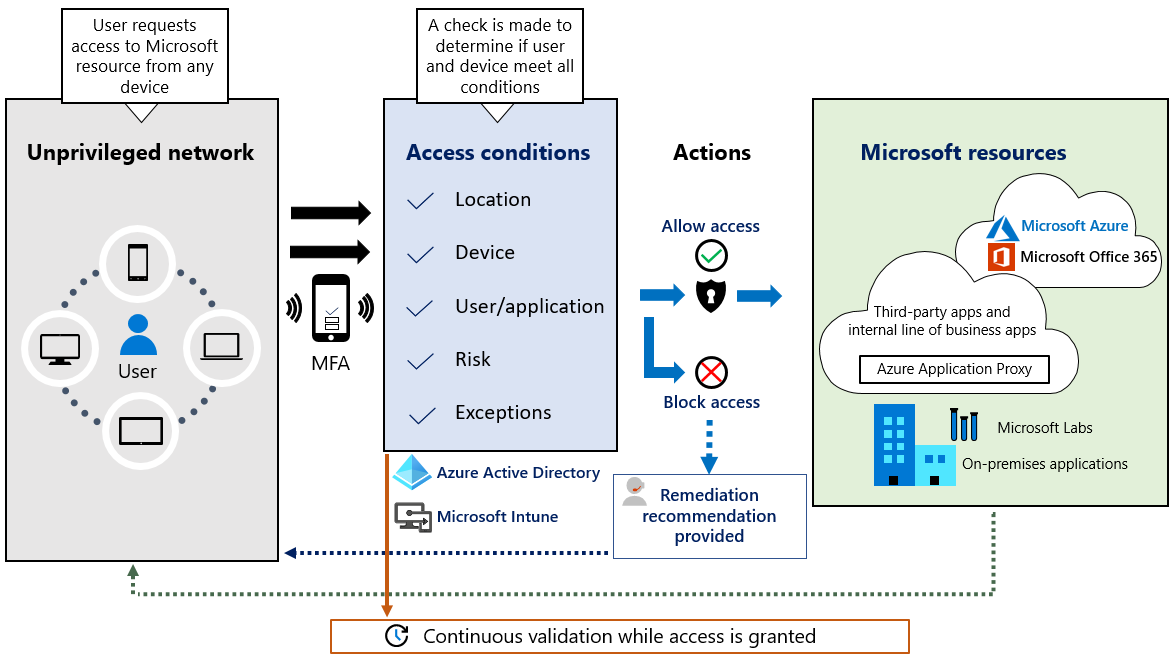
Source: https://www.microsoft.com/en-us/insidetrack/implementing-a-zero-trust-security-model-at-microsoft
On my day to day job, I help many organizations implementing all or part of the different phases of the Zero Trust model on their Microsoft 365 environment.
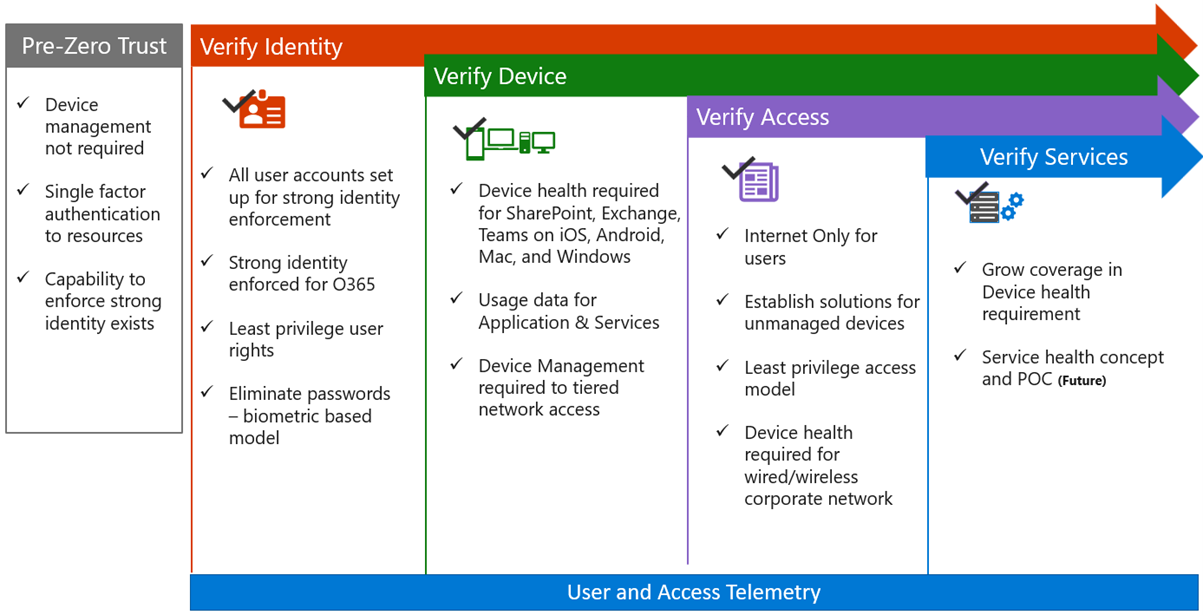
Source: https://cdn.techcommunity.microsoft.com/assets/VideoHub/SessionResources/Decks/1671199.pptx

About Me
Xuan Ahehehinnou
Microsoft 365 Solution Architect @Abalon
Microsoft Certified Trainer.